Introducing the New FACEIO Website: Updated Docs, More Languages, and New Products

The new FACEIO website brings together updated developer documentation, localized pages, accessibility guidance, and dedicated product pages for facial authentication, Meeting Shield, and ID Match.
enter image description here

For website owners and businesses, it makes the options easier to understand. For developers, it provides a clearer path from creating a FACEIO application to integrating the fio.js JavaScript library and connecting authentication results to an existing backend.

Updated Documentation, From Your First Integration to Production

The documentation follows the work developers need to do: create an application, configure it, integrate the widget, and handle the results.

Start with Getting Started, our guide to a 5-minute facial authentication integration. It walks through creating an application in the FACEIO Console, obtaining its Public ID, reviewing the security and privacy settings, and adding fio.js to your website or web app.

Then use the Integration Guide for method parameters, return values, error codes, and framework examples. It covers enroll() for registering new users, authenticate() for returning users, and session handling with restartSession().

The Developer Center connects these resources with the references you need as your implementation grows:

  • Facial ID reference: understand the identifier returned after enrollment and how to associate it with your own user accounts.
  • REST API reference: manage Facial IDs and use the documented backend endpoints while keeping private API keys on your server.
  • Webhook documentation: receive enrollment, authentication, and Facial ID deletion events in your backend.
  • Security best practices: review PIN Code validation, liveness settings, domain restrictions, and the controls needed around your login flow.
  • Privacy best practices: plan notices, consent, retention, deletion, and recognition-engine deployment.

Already using FACEIO? Revisit these references before your next release, especially if you are adding webhooks, changing security settings, or updating account-deletion workflows.

Read FACEIO in Your Language

The website and developer documentation are now available in four localized versions alongside English:

Use the language selectors in the header or footer to move between equivalent pages. Technical names such as fio.js, Facial ID, API methods, and error constants remain unchanged so they stay consistent with the code you write.

Website localization is separate from the embedded experience: the FACEIO widget supports more than 70 languages, helping teams provide enrollment and authentication flows for users in different markets.

Facial Authentication for Websites, Web Apps, and Corporate Portals

FACEIO facial authentication remains the core of the platform. It lets users enroll and authenticate through a browser widget, using the device's camera without requiring a native mobile app or a dedicated biometric sensor.

Developers load fio.js, initialize it with the application's Public ID, and connect enrollment and authentication to their existing interface. The library works with Vanilla JavaScript, React, Vue, Next.js, and other JavaScript stacks.

Your backend keeps control of accounts, sessions, recovery, and authorization. FACEIO does not store, handle, or access biometric hashes; the selected facial recognition engine manages them. The updated documentation explains these responsibilities and the available cloud and PixLab Insight on-premises deployment options.

Meeting Shield: Video Risk Signals for Business Meetings

FACEIO Meeting Shield is a Chrome extension for supported Google Meet, Zoom Web, and Microsoft Teams Web sessions.

It analyzes visible meeting video and reports suspicious signals associated with deepfakes, synthetic video, replayed footage, and manipulated facial motion. Its local-first analysis is designed to avoid uploading raw meeting video.

Meeting Shield is intended for situations such as remote interviews, executive calls, financial consultations, and customer meetings. It gives teams additional information to review before sharing sensitive information or making a decision. These signals support the organization's verification process; they do not establish a participant's identity or guarantee that every manipulated video will be detected.

Visit the product page to review how the extension works and request access through the FACEIO Console.

ID Match: Compare a Live Selfie with an ID Portrait

FACEIO ID Match brings a guided selfie-to-ID comparison into your website or web app.

It uses the same application setup and fio.js integration pattern as facial authentication. Calling idmatch() opens a popup that captures a live selfie and an ID document, performs a liveness check, and compares the selfie with the portrait extracted from the document. Your application can also request selected document fields.

Document scanning, portrait extraction, and optional field extraction are powered by PixLab DOCSCAN. Submitted images and processing data are handled in RAM and deleted immediately after the result is ready or the session fails. The processing pipeline retains no submitted images, document data, or scan logs.

ID Match compares the two faces. It does not authenticate the document, perform KYC or AML checks, or decide whether to approve a user. Your application determines how to use the returned result and any requested fields.

Accessibility Is Part of the Integration

The updated website also explains the FACEIO widget's accessibility features: visual and audio instructions, keyboard navigation, and screen-reader support with compatible browsers and assistive technologies.

These features help guide users through enrollment and authentication. Before release, test the complete experience within your own website or web app and provide another way to access an account for users who cannot or do not want to use facial authentication.

Start with the New Guides

Whether you are adding passwordless face login to a customer website, integrating facial authentication into a corporate portal, or exploring Meeting Shield and ID Match, start with the product pages and updated documentation.

Open the FACEIO Console to create an application and obtain its Public ID, then follow the Getting Started guide to integrate fio.js.

For explanations and implementation articles, explore the FACEIO Knowledge Center. For public technical questions, join the FACEIO Community Forum.
PixLab & FACEIO Pricing Update: Clearer Plans, Better Value, More Power 🚀

We’ve just rolled out an important pricing update across PixLab and FACEIO, and it’s one we’re genuinely excited about. The goal is simple:

make our plans clearer, fairer, and better aligned with how developers, teams, and businesses actually use our products.

If you’ve been using PixLab or FACEIO or thinking about it, this update is for you.

Pricing Update


Why We Updated Our Pricing

Over time, PixLab and FACEIO have grown from individual APIs into full AI platforms used in production by developers, startups, and enterprises worldwide.

Our previous pricing tiers were functional, but they didn’t fully reflect:

  • The maturity of the products
  • The real value delivered at each level
  • The different needs of individuals vs. businesses vs. enterprises

So we redesigned the pricing ladder to be:

  • More intentional
  • Easier to understand
  • Better at guiding users to the right plan

The New Pricing Plans

Here’s the updated pricing for both PixLab and FACEIO:

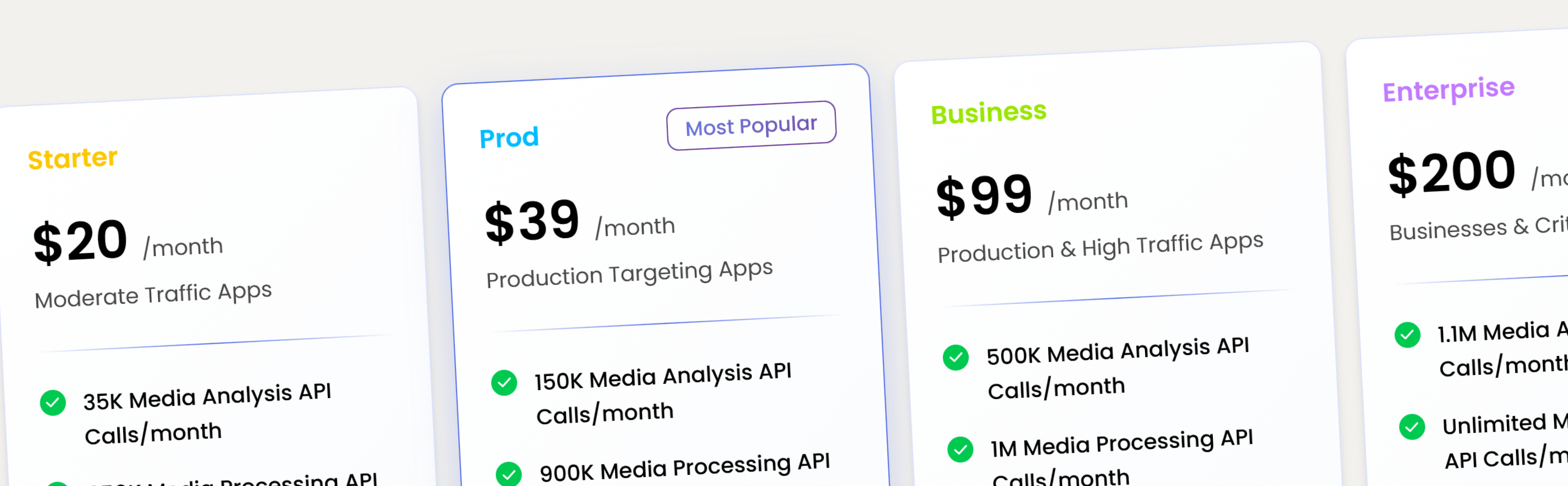
Plan Price Best for
Starter $20 / month Developers getting started, testing, small projects with moderate traffic
Pro $39 / month Serious individual users and small teams with high traffic
Business $99 / month Production workloads and growing companies
Enterprise $200+ / month High-scale, compliance, and custom needs

Each step represents a real jump in capability, not just a cosmetic upgrade. View full pricing details:


Why This Pricing Works Better

Each tier now has a clear purpose. No confusion. No overlap:

  • Starter → moderate traffic apps, and early usage
  • Pro → daily, production ready, serious usage
  • Business → production and team workflows
  • Enterprise → scale, compliance, and support

What This Means for You

If you’re already a user:

  • You now have clearer upgrade paths
  • Better alignment between price and features
  • Plans that grow with your usage

If you’re new:

  • You can start at $20 with confidence
  • Upgrade only when you actually need more power
  • No artificial complexity or hidden traps

Try the New Plans Today

Whether you’re building:

  • AI-powered apps
  • Face authentication systems
  • OCR and document workflows
  • Computer vision pipelines
  • Enterprise-grade AI solutions
  • Content Creation & Visual Marketing via BG-REMOVE and TXT-REMOVE APIs

The new PixLab and FACEIO plans are designed to support you from first experiment to full production. Get started now:

PixLab

FACEIO


Final Thoughts

This pricing update isn’t about charging more.
It’s about pricing honestly, supporting growth, and building long-term trust.

As always, thank you for building with PixLab andFACEIO. 💙

FACEIO Platform Update: Enhanced Passwordless Authentication & Attendance Monitoring for Businesses via Face Recognition

We’re excited to announce the new major release of FACEIO, the world’s easiest-to-integrate Facial Recognition SDK for web and mobile applications. Whether you're a developer building secure apps, a small business owner wanting frictionless login, or managing employee attendance, We have exciting updates, and FACEIO is the perfect solution for your use case.

FACEIO Landing Page

This release brings enhanced passwordless login, real-time liveness detection, accurate age verification, and enterprise-grade on-premises biometric authentication.

Why FACEIO?

FACEIO lets you authenticate users using just their face—no passwords, OTPs, or captchas. Built with privacy and simplicity in mind, it’s ideal for:

  • Web-based facial recognition login
  • Biometric authentication for websites and apps
  • Employee attendance tracking
  • Online age verification with face
  • Liveness detection and deepfake prevention

Now, with this release, FACEIO is even more powerful and secure.

What’s New in This Release?

✅ Liveness Detection API

Prevent spoofing and ensure every face is a real, live user. Our new liveness detection API uses motion, blink, and 3D cues to stop deepfakes and printed-photo attacks in real time.

✅ Age Verification SDK

Need to restrict content or features by age? Our age verification SDK instantly classifies users as minors or adults based on facial features, perfect for e-commerce, gaming, and community platforms.

✅ Improved Developer SDK

  • New JavaScript SDK (@faceio/fiojs) is lighter and faster, and available via NPM.
  • Simplified enrollment & authentication methods: fio.enroll() and fio.authenticate()
  • Full documentation with live demos and examples

📘 Get started quickly with our Integration Guide
→ Or jump straight into the Getting Started Page

Built for Security & Privacy

FACEIO is designed from the ground up with privacy-first principles and strong data protection in mind. No images are stored, only encrypted facial hashes. We meet global compliance standards and offer full transparency on our security architecture.

🔐 Explore our Security Best Practices
🔍 Learn more about Privacy & App Best Practices

Join the FACEIO Developer Community

Need help, feedback, or want to share your project? Join other developers and FACEIO users in our growing Community Forum where we discuss integration tips, use cases, and updates.

⚡ Ready to Go Passwordless?

Integrate biometric face authentication into your web app in under 5 minutes with just a few lines of code.

✅ Lightweight SDK
✅ Secure facial login
✅ Age and fraud detection
✅ Real-time liveness checks
✅ On-premise deployment options for enterprises

Start now with the FACEIO Getting Started Guide →

FACEIO — the secure, developer-first solution for online face login, biometric authentication, and passwordless access.

Resolving Liveness Detection with FACEIO's Advanced AI Models

Liveness detection is a critical component in biometric security systems, ensuring that the face being scanned is from a live person rather than a photograph, video, or mask. FACEIO, a leader in facial authentication technology, addresses these challenges with its advanced AI models. This blog post explores how FACEIO resolves liveness detection issues, leveraging sophisticated algorithms and security practices.

FACEIO Landing page

What is Liveness Detection?

Liveness detection is a security feature used in facial recognition systems to verify that the scanned face is from a live individual. It prevents spoofing attacks by detecting natural facial movements and responses. Various techniques employed in liveness detection include:

  • Motion Analysis: Detects natural movements such as blinking and head movements.
  • Texture Analysis: Differentiates between the texture of live skin and that of a photograph or screen.
  • Challenge-Response: Prompts the user to perform actions like blinking or smiling to prove liveness.

Implementing Liveness Detection with FACEIO

FACEIO provides an easy-to-integrate solution for facial authentication with built-in liveness detection. Here is a step-by-step guide to activate liveness detection on your FACEIO Application:

  1. Setting Up FACEIO:

  2. Integrating FACEIO SDK:

  3. Initializing FACEIO:

  4. Implementing Liveness Detection:

    • Activate Face Anti-Spoofing first by connecting to the FACEIO Console, then Navigate to the SECURITY tab from the manager main view. Once the target application selected. Activate the Protect Against Deep-Fakes & Face Spoof Attempts security option as shown below:

      async function performLivenessCheck() {
       try {
           const response = await faceio.authenticate({ action: "liveness-check" });
           if (response.livenessScore > 0.9) {
               console.log("User authenticated successfully");
           } else {
               console.warn("Liveness check failed");
           }
       } catch (error) {
           console.error("Liveness check failed", error);
       }
      }
      

Advanced Security Features of FACEIO

FACEIO's commitment to security extends beyond basic liveness detection. Here are some of the advanced features that enhance its security:

  • Multifactor Authentication (MFA): Combine facial recognition with other authentication methods for added security.
  • Customizable User Prompts: Tailor instructions and prompts shown to users during the liveness check.
  • Analytics and Reporting: Access detailed reports on authentication attempts to monitor and improve system performance.

Best Practices for Secure Implementation

FACEIO provides several security best practices to ensure robust protection against spoofing and other security threats:

  • Reject Weak PIN Codes: Ensure users create strong PIN codes during enrollment.
  • Prevent Duplicate Enrollment: Avoid multiple enrollments by the same user.
  • Protect Against Deepfakes: Use liveness detection to counteract spoofing attempts.
  • Forbid Minors: Prevent minors from enrolling in the application.
  • Always Ask for PIN Code: Require PIN code confirmation during authentication for added security.
  • Enforce PIN Code Uniqueness: Ensure each user's PIN code is unique.
  • Ignore Obscured Faces: Reject partially masked or poorly lit faces.
  • Reject Missing HTTP Headers: Prevent requests without proper origin or referer headers.
  • Restrict Domain and Country: Limit widget instantiation to specific domains and countries.
  • Enable Webhooks: Use webhooks for real-time updates on user interactions.

Conclusion

Integrating FACEIO for liveness detection and facial authentication in JavaScript significantly enhances digital security. Its robust API and user-friendly JavaScript library make it easy for developers to implement biometric authentication, preventing spoofing and unauthorized access. FACEIO's advanced features and best practices ensure both security and user experience are prioritized, making it a valuable addition to any web application's defense against modern threats.

For more information, visit the FACEIO website.


Published in: Level Up Coding

Launching FACEIO's New Age Verification Widget: Elevating Digital Experiences

PixLab is thrilled to announce the launch of FACEIO's pioneering Age Verification Widget, a remarkable addition to the FACEIO SDK suite, specifically designed for web and mobile platforms. This state-of-the-art widget provides real-time age verification, ensuring that users can access content suitable for their age group, thereby promoting a safer digital environment.

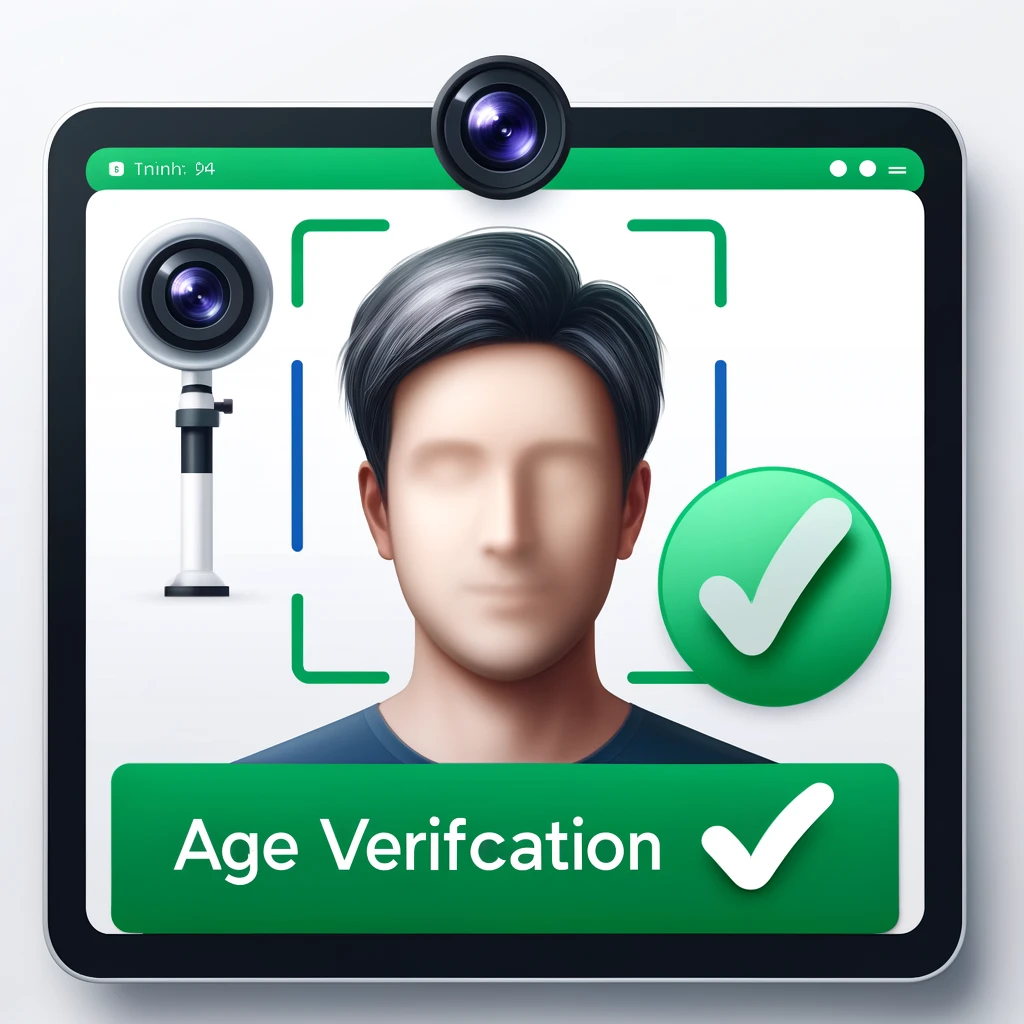
FACEIO Age Verification

Key Features and Benefits

  • Instant Verification: The FACEIO Widget verifies user age in milliseconds, using advanced facial analysis to swiftly differentiate minors from adults.
  • Enhanced Compliance: With precise age distinction, businesses can effortlessly adhere to regional and global age-related regulations, minimizing legal risks.
  • Seamless Integration: Developers can easily incorporate the widget into existing platforms with minimal effort, supported by comprehensive documentation available on our Integration Guide and Developer Guides.

A Tool for All Digital Arenas

Whether you're managing an online gaming site, a digital marketplace, or a content streaming service, the Age Verification Widget is your solution to maintaining age integrity online. It ensures that each user's experience is not only compliant with legal standards but also tailored to their age-specific needs.

Future-Proof Your Platform

As digital interactions become increasingly personalized and regulated, integrating robust age verification technology is more crucial than ever. The FACEIO Age Verification Widget is more than just a tool—it's an investment in your platform's future, safeguarding your operations and enhancing user trust.

For more details on how to get started, visit our detailed documentation provided in the Integration Guide and the Developer Guides.

fio.js V2.1 Released with Age Verification & Minors Access Restriction

The FACEIO Development Team is thrilled to announce the immediate availability of fio.js V2.1, our cutting-edge Facial Recognition Web Framework with groundbreaking new features with the goal of enhancing security and compliance for your applications.

Over the past few months, we have developed an innovative age verification security option that prevents minors from on-boarding on your application, ensuring your sensitive services remain accessible only to the appropriate age groups.

FACEIO Landing Page

Enhanced Security with Minors Access Prevention 🛡️

Prevent Minors From Enrolling

When activated, this powerful security feature diligently screens and identifies users' age during the on-boarding process, and thus will forbid minors less than 18 years old from enrolling on your application with the fioErrCode.MINORS_NOT_ALLOWED error code being raised if a minor try to on-board on your application, reinforcing your compliance and security measures. This highly requested security feature is immediately available to trigger from the FACEIO Console. Please refer to the updated boilerplate integration code to see this feature in action.

Comply with Jurisdictional Regulations 📜

If your application is offering sensitive services or operating in jurisdictions such as the UK and certain US states that strictly prohibit minors from accessing such services, this security feature is mandatory & invaluable tool for you. By activating it, you can seamlessly align with legal requirements and ensure that only eligible users gain access to your platform.

PAS 1296:2018 Compliance & Age Verification Check

We understand the criticality of meeting industry standards and regulations. That's why we are excited to inform you that PixLab Insight, the default Facial Recognition Engine for FACEIO, is ready to fulfill the PAS 1296:2018 code of practice for online age verification accredited by the UK's Age Check Certification Scheme (ACCS). Our technology guarantees robust age verification capabilities, bolstering your compliance efforts.

Experience the Future of Secure Facial Recognition ✨

At FACEIO, we are committed to providing you with state-of-the-art tools to safeguard your applications and users. The introduction of Minors Access Restriction adds an extra layer of security, giving you peace of mind and enabling you to cater to the right audience for your services.

To explore this exciting new feature and integrate it into your application, simply connect to the FACEIO Console, and activate this option from the Security Tab of your Application Manager. Our comprehensive documentation will guide you through the activation process and assist you in optimizing the functionality for your unique requirements.

24/7 Support & Integration Assistance

We would be thrilled to assist you in implementing the Minors Access Prevention Security Feature or answer any questions you may have. Reach out to our dedicated support team via the FACEIO Console or the Community Forum. Our experts are ready to provide you with top-notch assistance and help you unlock the full potential of FACEIO.

Embrace the power of age verification and elevate the security standards of your FACEIO application. Join us on this exciting journey as we revolutionize facial recognition technology together!

Stay secure, stay compliant, and stay ahead with FACEIO!

New REST API Endpoints Available for FACEIO

The FACEIO development team is pleased to announce the general availability of new REST API Endpoints for developers implementing fio.js, our facial authentication library on their websites or web applications.

FACEIO Landing Page

With the new API Endpoints, you can now programmtically talk to your FACEIO application via your private backend regardless of the underlying programming language whether it is Python, Ruby, Java, PHP, etc. as long as it supports HTTP based requests.

These endpoints have been designed with developers in mind and are fully documented, making it easy for the developer to get started. The list of new released API endpoints includes but not limited to:

To get started with the new REST API endpoints, simply head over to faceio.net/rest-api and consult the documentation. The documentation is comprehensive and includes examples to help you get started quickly.

We are confident that the new released API endpoints will be a valuable addition to your FACEIO integration and will help developers automate tasks such as Facial ID Deletion, PIN Code Reset, Payload Update, etc.

Finally, If you have any questions or feedback, please do not hesitate to raise a support ticket via the FACEIO Console. Our team is always ready to help and support you in any way we can.

Webhooks Enhancements & Performance Improvements

FACEIO Landing Page

Starting with the major release of fio.js 1.9, FACEIO Webhooks have been rebuilt from the ground up to improve latency and provide new functionality like payload field inclusion which is available starting from the Business Plan, and up.

Webhooks allows you to receive data and get notified at real-time about the ongoing events during the interaction of the FACEIO Widget with your users (eg. New user enrollment or authentication) in-order to keep your application backend up-to-date & synchronized. FACEIO uses Webhooks to let your system know when such events happen. Events includes New User Enrollment, Facial Authentication Success, Facial ID Deletion, and many other events.

When an event occurs, FACEIO makes an HTTP POST request to the URL you configured for the Webhook. FACEIO’s request includes details of the ongoing event such as the Unique Facial ID of the user being enrolled or authenticated, its gender & age in case of new enrollment, timestamps, event type, IP information, linked payload, and many others details.

Enabling Webhooks

Registering your Webhook endpoint URL for receiving events for your FACEIO application is straightforward as shown in the detailed steps below:

  1. Connect to your account via the FACEIO Console first.
  2. From the console main view, visit the Application Manager.
  3. Select the target application for which you want to setup webhooks for.
  4. Navigate to the WEBHOOKS tab from the manager main view.
  5. Once the target application selected. Enter your Webhook Endpoint URL for receiving events and save your modification.
  6. You're all set. Upon an event is triggered, FACEIO shall make an HTTP POST request to the URL you configured for the Webhook with the appropriate fields.

Major Enhancements

Starting with the 1.9 release, here are the quick highlights, with more details in the Webhooks page dedicated documentation:

  • Faster notifications.
  • JSON Based POST Requests.
  • IPv6 Support.
  • Payload Field Inclusion.
  • HTTP1.1/2 Protocol Support.
  • Full Support for TLS 1.3 Requests.

fio.js V1.9 Released with Face Duplication Prevention

FACEIO Logo

The PixLab development team is pleased to announce the immediate availability of FACEIO's fio.js V 1.9. A major release which implements highly requested features from our customers including but not limited to:

  • Face Duplication (same user enrolling twice or more) Prevention.
  • Dynamic Session Reloading without Page Refreshing.
  • Faster facial features collection during enrollment.
  • Upto 1.3x faster facial authentication operation.
  • French, Japanese, Vietnamese & Dutch new language packs.

As usual, this update is transparent to our end users & fio.js implementers, and no action is required on your side if you link directly the library from the FACEIO CDN.

Face Duplication Prevention:

Face Duplication Prevention

When enabled, this option shall prevent the same user from enrolling twice or more on your application. That is, if the facial features of the user being enrolled are already recorded, the enroll operation is aborted, and the fioErrCode.FACE_DUPLICATION error code is raised to your host application instead. This option is immediately available to trigger from the FACEIO Console. Please refer to the updated boilerplate code to see this feature in action.

When this option is disabled (default case), it is considered, a no-error operation for the same user to enroll twice or more on your application. This will trigger a collision, and ask the user to confirm his PIN code whenever an authentication operation occurs with the user in question.

Session Reloading without Page Refreshing:

The introduced restartSession() method let you purge the current user session and request a new one. By default, sessions in FACEIO starts following the first call to the enroll() or authenticate() method whichever comes first, and are immutable. After successful call to this method, the old session is discarded, a new one is created, and you can perform another round of calls to enroll() or authenticate() for the same user without reloading (refreshing) the entire HTML page or relying on an external JavaScript function such as location.reload() to do so.

Please note that dynamic session generation via this method are available to the Premium Plans only. Think of upgrading your Freemium application from the FACEIO Console first before calling this method on your frontend

Finally, for additional information & to learn more about implementing FACEIO on your website or web application, please refer to the following documents:

  • Getting Started Tutorial: Learn the fundamentals about implementing facial authentication on a typical web application.
  • Integration Guide: Learn how to implement fio.js, our facial recognition library on your website.
  • Developer Center: Code samples, documentation, support channels, and all the resources yo need to implement FACEIO on your website.
  • Frequently Asked Questions: Get instant answers to the most common questions.
  • Trust Center: Learn how we handle your data securely and in compliance with privacy and legal requirements.

Press Release & New Languages Pack for FaceIO

We are pleased to share our Press Release launch document, as well as, new enhancement introduced to FaceIO, our Web based facial Recognition framework for Websites & Web applications with a set of new languages pack for a more than friendly user experience (UX).

New FaceIO language pack

Since its launch two months ago, FaceIO have been proven to be a rock solid product, with a slick & easy integration regardless of the underlying JavaScript framework whether it is React.js, Next.js, Vue.js, Angular or even Vanilla JavaScript. As of this announcement, Over 10K FaceIO Applications has been deployed, easing users authentication thanks to a passwordless experience powered by face recognition.

Available Language Pack

  • English (en Default, fallback language)
  • German (de)
  • Portuguese (pt)
  • Spanish (es)
  • Dutch (nl)
  • Japanese (ja)
  • French (fr)
  • Vietnamese (vi)
  • Indonesian (id)
  • Malay (ms)
  • Turkish (tr)

Upcoming Language Pack

  • Korean (kr)
  • Arabic (ar)
  • Italian (it)
  • Simplified Chinese (cz)
  • Polish (pl)
  • Russian (ru)
  • Czech (cs)

FaceIO Launch Press Release

Symisc Sytems Logo

Community Articles & Tutorials

FaceIO Logo

It’s super quick to implement FaceIO, and get it up & running on your website or web application. The following tutorials, and guides should help you roll facial recognition to your web users in a straightforward manner: