Junior Developers Can No Longer Write a Working Function Without a Chatbot

At Symisc Systems, PixLab's parent company, we have taken on top engineering students from selective schools either remotely or on-site for their projets de fin d'รฉtudes, or final-year projects. Some worked on embedded software in C/C++. Others worked on web development in vanilla JavaScript.

One striking pattern is how often even bright students struggle to write a complete, working function without returning to a chatbot for help.

Among the more than 20 students we observed, the tools in use were either ChatGPT or Z.ai's GLM models. Curiously, we did not see anyone using Anthropic's Claude. This was simply something we noticed while working with them, not a formal survey.

An assignment on our Think-Act Desktop Agent gives a good example of what concerned us.

A small dashboard task

A junior developer was asked to write an analytics function for the agent's internal usage dashboard. The task was to retrieve statistics stored as JSON in Redis through the backend and display them on the page using vanilla JavaScript.

He had a master's degree and was actively looking for a job.

During the implementation, he kept returning to his chatbot for elementary questions, including how to get an HTML element by its ID.

That meant looking up document.getElementById().

There is nothing wrong with forgetting a method name. We look things up every day, and using a chatbot for that is perfectly reasonable. What caught our attention was how much of the implementation depended on asking for the next step.

We expected him to need help with our codebase. But inspecting a JSON response, selecting an element and updating its contents should have been familiar enough for him to make progress independently.

Completing the assignment is only part of it

A student can follow a generated implementation and understand each line when it is explained. Writing a similar function from scratch can still be difficult.

The first attempt is where you have to make your own decisions. You inspect the input, decide what to do with it and discover what you misunderstood. Even a small function gives you practice that should make the next one easier.

When the chatbot supplies every step, it becomes harder to know how much of that practice is actually happening.

We build AI products ourselves. We see the usefulness of these tools, and there is no reason to ban them from an internship. But getting the work finished cannot be the only measure of a successful placement. The student should leave more capable than when they arrived.

A reasonable expectation

For a task like this, we think it is reasonable to ask a junior to make an initial attempt before requesting a generated solution. Read the documentation, inspect the response and try the implementation. Then use the chatbot to help with a specific difficulty.

Code review should include a conversation about the work. Ask the student to explain a condition, handle an empty response or make a small change. There is no need for a memory test or an interrogation.

A master's degree does not mean someone knows everything, and nobody expects a junior to work without help. But after implementing one dashboard function, they should be better equipped to write the next.

That is what we want to see: not whether they stop using the chatbot, but whether they need less guidance as they gain experience.

This is how we build our frontends

At PixLab, we use only vanilla JavaScript for frontend development. No React, no Vue. The same approach powers our customer dashboard, which serves thousands of customers, with a backend ingesting millions of real-time API usage records.

We had not removed a framework to make the assignment harder. He was working with the tools we use in production.

Customers rely on that dashboard to check usage for services such as our background removal API. Whether we are displaying those request counts or reviewing Think-Act activity internally, someone needs to understand how the data reaches the screen and why a number might be wrong.

That was the useful part of the assignment: following the data, writing the function and checking its behavior. It was also an opportunity to become comfortable with basic browser development.
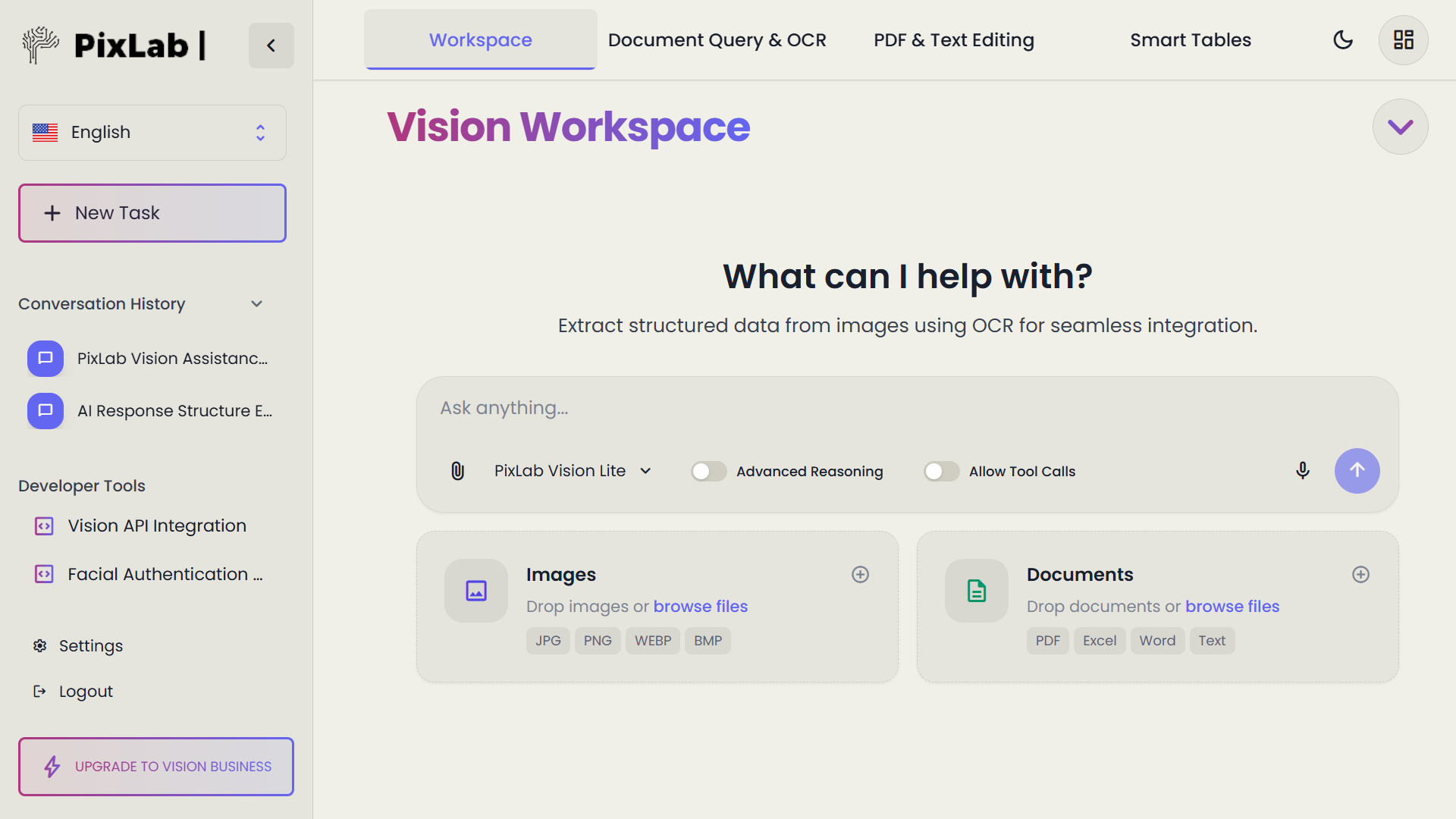
PixLab Vision Workspace Launches Globally with Localized Versions for US, Japan, Indonesia, Brazil & More

We're thrilled to announce the global release of PixLab Vision Workspace, the next-generation AI-powered productivity suite built for both solo professionals and enterprise teams. With localized versions for Japan, Indonesia, Brazil, and Spanish-speaking markets, PixLab Vision is now ready to power your business โ€” no matter where you are.

PixLab Vision Workspace

๐Ÿ‘‰ Try it now: vision.pixlab.io


๐Ÿ—พ Tailored for Japan and Emerging Markets

PixLab Vision isnโ€™t just translated โ€” it's culturally and technically localized for real-world business users:

  • ๐Ÿ‡ฏ๐Ÿ‡ต Japanese Interface: Available at pixlab.io/vision-platform/workspace-jp
  • ๐Ÿ‡ฎ๐Ÿ‡ฉ Bahasa Support: Optimized for the Indonesian market
  • ๐Ÿ‡ง๐Ÿ‡ท Brazilian Portuguese: UX tailored to local workflows
  • ๐ŸŒŽ Spanish Version: For Latin America and global Spanish-speaking professionals

Whether you're a solo entrepreneur, a corporate team, or a creative agency, PixLab Vision adapts to your language, data security expectations, and local compliance standards.


Unified AI-Powered Workspace

PixLab Vision Workspace is more than a document viewer โ€” itโ€™s a full AI workspace backed by PixLabโ€™s proprietary Vision-Language Models (VLMs) and robust reasoning APIs.

Key Features:

  • Document AI: Upload images, PDFs, Office files โ€” then extract structured data using OCR & LLM reasoning.
  • Smart Chat: Talk to your documents using natural language. Summarize, edit, translate, extract insights.
  • Spreadsheet + Markdown: Built-in editors for tabular data, reports, blog posts, and contracts.
  • Annotation Tools: Comment, highlight, and mark up documents with collaborative tools.
  • API Integration: Use PixLabโ€™s REST endpoints including:
    • /llm-parse โ€“ Extract data from unstructured files
    • /tool-call โ€“ Call tools in real-time from your LLM
    • /query โ€“ Ask questions about images and documents

Freemium vs Premium: What's Included?

Feature Freemium Premium
Storage Local device only (browser) Cloud sync across devices
Document History Local only Persistent and shareable
OCR & LLM Parse Available Enhanced throughput
Team Collaboration Not included Multi-user collaboration tools
File Size Limit Up to 10MB Up to 250MB per file
Priority Support Community only Email & SLA-based corporate support

Freemium users enjoy complete privacy with local data storage: all OCR scans, edits, and chat histories stay on your browser.
Premium plans unlock cloud sync, API credits, and enterprise-grade security for distributed teams.


Who Is It For?

PixLab Vision Workspace is already used by:

  • SMBs & solo founders in Japan digitizing business receipts and contracts
  • Marketing agencies automating content repurposing and document translation
  • Enterprise teams managing compliance, contract processing, and data entry at scale
  • Developers integrating OCR, chat, and document extraction directly into their products via PixLabโ€™s APIs

Start Using PixLab Vision Today

Whether you're streamlining your office work, building automation workflows, or integrating AI into your app, PixLab Vision puts the entire productivity stack in one place.

Let the AI handle the boring parts, so you can focus on growing your business.

๐Ÿ‘‰ Get started today at vision.pixlab.io

๐Ÿ‘‰ Learn More at: pixlab.io/vision-platform/workspace

Explore the New PixLab Vision Platform VLM API Endpoints

PixLabโ€™s Vision VLM Platform introduces a groundbreaking set of Vision Language Model (VLM) endpoints that combine natural language processing and computer vision in a simple, developer-friendly API suite.

PixLab Vision Platform

From querying images and parsing complex documents to generating PDFs and extracting ID data, the PixLab VLM API makes it easy to integrate intelligent image and document analysis into your own apps.


Vision Language Model Endpoints

These endpoints allow your application to understand images and video frames with natural language intelligence.

  • /query โ€“ Ask natural language questions about images and receive contextual answers
  • /describe โ€“ Get a natural language description of an image
  • /tagimg โ€“ Retrieve tags describing the image content
  • /detect โ€“ Detect and localize objects in the image
  • /vocr โ€“ OCR via vision models for printed text
  • /nsfw โ€“ Detect explicit content in media

Unstructured Document Parsing

Parse unstructured documents like invoices, receipts, and contracts using VLM-powered tools.

  • /llm-parse โ€“ Extract data from complex document layouts using a user-defined schema

Embedding APIs

Turn your content into machine-understandable vectors for search, indexing, and matching.

  • /txt-embed โ€“ Generate semantic embeddings from raw text
  • /img-embed โ€“ Generate vector embeddings from images

These endpoints are perfect for building your own AI-powered similarity search or recommendation systems.


Image Processing & Background Removal

PixLab also provides classic computer vision capabilities enhanced by AI.

  • /bg-remove โ€“ Remove background or unwanted objects from images
  • /docscan โ€“ Scan and extract JSON data from over 11,000 supported ID document types from 200+ countries
  • /nsfw โ€“ Pixelate or block NSFW content automatically

PDF Generation & Conversion

Create and manipulate PDF documents programmatically using these SDK-free endpoints:

  • /pdfgen โ€“ Generate media-rich PDFs from HTML or Markdown
  • /pdftoimg โ€“ Convert PDF files into image previews

LLM Tool Calling Infrastructure

PixLab provides built-in tools for enhancing your LLM pipeline:

  • /llm-tool โ€“ Get a list of tools callable from your LLM
  • /tool-call โ€“ Execute a tool call based on LLM output

These endpoints enable your LLM agent to execute functions dynamically and return results within the same context.


System Tools & Metadata

Helpful utility endpoints for checking server health and supported formats:

  • /status โ€“ View current system status
  • /about โ€“ Get PixLab version & license info
  • /extension โ€“ Retrieve supported file extensions

Explore the Full API Suite

PixLab offers over 150 RESTful endpoints for vision, media, and document automation tasks. Visit the following links to dive deeper:


Final Thoughts

Whether you're working on an AI productivity suite, eKYC onboarding, or document automation pipeline, PixLabโ€™s VLM API delivers powerful, production-ready tools in minutes. All endpoints are accessible via secure HTTP requests and require no proprietary SDKs.

Get started by signing up for an API key at PixLab Console and explore what's possible with Vision Language Models.

Build smarter apps โ€” faster.