World Lens is now live on the App Store for iPhone and iPad.
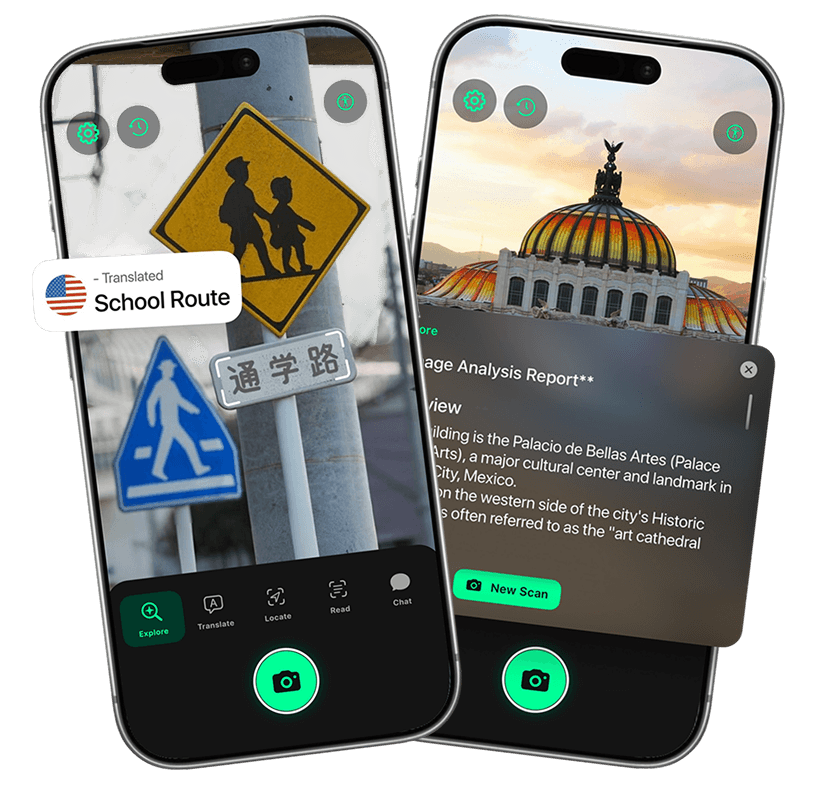
Built by PixLab Mobile Team, World Lens is a camera-first visual search app designed to help people understand the world around them faster. Point your camera at an unfamiliar object, a menu, a street sign, a landmark, a product label, or a printed page, and World Lens helps you identify, translate, read, and explore what you see in seconds.
This release brings together object recognition, text translation, read-aloud OCR, place recognition, QR scanning, and follow-up visual chat in one polished iOS experience. Instead of jumping between multiple apps for search, translation, camera scanning, and accessibility support, World Lens brings those real-world tasks into one flow.
Official Links
What World Lens Does
World Lens turns your iPhone camera into a practical visual assistant for everyday life, travel, accessibility, and quick discovery.
With World Lens, you can:
- Identify unknown objects around you
- Translate signs, menus, labels, and printed text
- Read real-world text aloud
- Recognize landmarks and nearby places
- Open supported place results in Maps
- Scan QR codes and supported barcodes
- Ask follow-up questions about what you just scanned
- Analyze both live camera captures and images from your gallery
The goal is simple: move from seeing to understanding with as little friction as possible.
Built for Real-World Visual Search
Many camera apps handle only one narrow task. One app scans QR codes. Another translates text. Another tries to identify objects. Another reads printed content aloud. World Lens was built to combine those common visual tasks into a single iPhone app that feels cohesive and fast.
That means you can use the same app whether you are trying to:
- figure out what an unfamiliar object is
- understand text in another language
- recognize a place while traveling
- read printed content more easily
- ask a follow-up question after a scan
World Lens is designed for the moments when you do not know exactly what you are looking at, what it says, or what to do next.
Key Features in the First App Store Release
Identify Unknown Objects
Point your camera at gadgets, tools, products, plants, signs, or everyday items and get fast, useful context. World Lens is built to help when keywords are unclear and manual search would slow you down.
Translate Text in Context
World Lens can translate text from menus, packaging, street signs, notices, labels, and printed pages. This makes it especially useful while traveling or navigating unfamiliar environments where speed matters.
Read Text Aloud
For users who want spoken assistance, World Lens can extract visible text and support read-aloud flows for signs, notices, labels, and printed material. This also makes the app more useful for accessibility-focused scenarios.
Recognize Places and Landmarks
World Lens can help identify nearby landmarks and places, then continue into Maps when supported. This makes it practical for city walks, tourism, local exploration, and everyday navigation.
Ask Follow-up Questions
A scan result is often only the start. World Lens includes scan-based chat so users can ask natural follow-up questions about what they just captured and get more context instead of stopping at a one-line answer.
Scan QR Codes and Barcodes
World Lens also covers fast utility scans. Open links from QR codes and detect supported barcodes without switching to a separate scanner app.
Use the Camera or the Gallery
The app is not limited to live capture. You can also analyze images from your photo library, which is useful when you want to revisit an image, check something later, or work from an existing screenshot or photo.
Why We Built World Lens
We built World Lens around a simple idea: visual understanding on mobile should feel more direct.
In everyday life, people constantly run into small moments of uncertainty:
- What is this object?
- What does this sign say?
- Is this a landmark or local place?
- Can I ask something more specific about what I just scanned?
- Can I get this text read aloud quickly?
These are common camera-driven tasks, but they are often spread across too many separate tools. World Lens brings them together into a single experience that feels practical instead of fragmented.
Who World Lens Is For
World Lens is useful for a wide range of users:
- Travelers who need help reading signs, menus, and labels
- Students who want to understand objects, places, and printed content faster
- Shoppers checking labels, packaging, and unknown products
- Explorers learning more about places and landmarks around them
- Accessibility-focused users who benefit from text reading and spoken output
- Curious users who want a faster way to identify things around them
This is not a niche utility. It is a general-purpose visual tool for real life.
Available Now on iPhone and iPad
World Lens is now available on the App Store for iPhone and iPad.
If you want a faster way to identify objects, translate text, understand places, read printed content aloud, and ask questions about what you see, World Lens is ready to use today.
What Comes Next
This App Store release is the foundation for World Lens. We will continue refining the experience, improving scan quality, expanding visual understanding flows, and making the app more useful across travel, accessibility, education, and everyday discovery.
For now, the focus is clear: make it easier to understand the world around you with your camera.