PixLab Announces Faster Background Removal, Text Watermark Removal, and Document Parsing APIs

PixLab has rolled out a new production-ready version of its image and document automation stack, bringing major improvements to background removal, text watermark removal, and AI-powered document parsing.
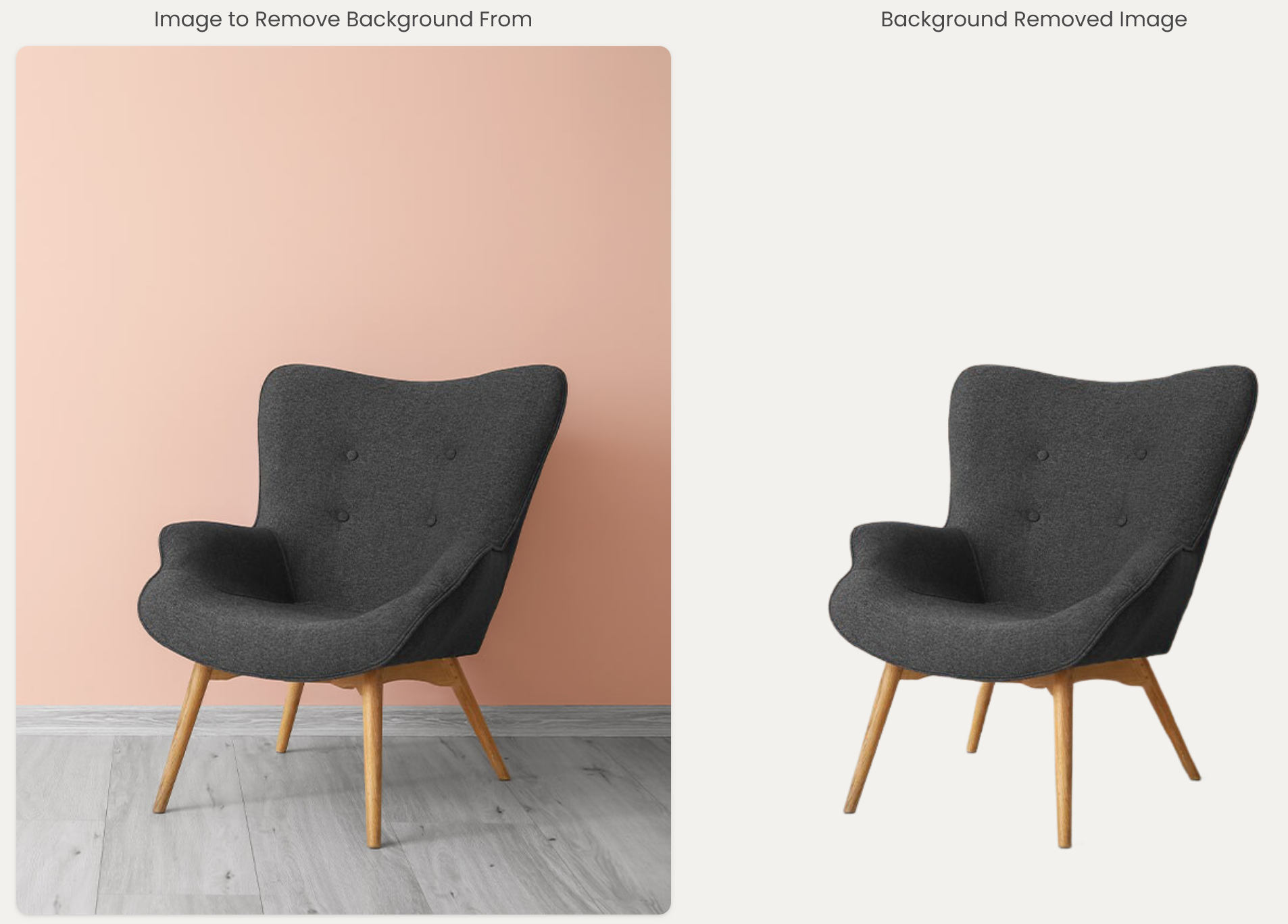
bgremove

This update introduces newer models, faster processing, improved accuracy, and a more robust production runtime for developers building high-volume image and document workflows.

What Is New

The upgraded PixLab APIs are designed to deliver better results with less operational friction:

  • Faster background removal for product images, portraits, marketing assets, and user-generated content.
  • More accurate text and watermark removal across complex image backgrounds.
  • Improved handling of rotated, angled, and partially transparent text overlays.
  • More reliable document parsing for PDFs and business documents.
  • Production-hardened processing built for scalable API workloads.

These improvements are available through the existing PixLab developer experience, so teams can continue using the same documented endpoints while benefiting from the upgraded processing layer.

Background Removal API

The PixLab Background Removal API automatically isolates foreground subjects and returns a clean transparent PNG output. It is useful for ecommerce, profile photos, creative tools, media automation, and any workflow that needs fast object cutouts.

The new version improves both speed and mask quality, producing sharper foreground edges and more stable results across a wider range of image types.

Documentation: Background Remove API

Text Watermark Removal API

The PixLab Text Watermark Removal API removes visible text overlays and watermarks from images while preserving the surrounding visual context.

The upgraded models improve detection quality, especially for angled text, repeated watermarks, mixed backgrounds, and real-world image content where text may be partially transparent or blended into the scene.

Documentation: Text Watermark Remove API

Document Parse API

The PixLab LLM Parse API extracts structured content from documents and converts files into developer-friendly output formats. It is built for workflows such as document ingestion, OCR-assisted parsing, data extraction, search indexing, and AI document pipelines.

The new version improves parsing reliability and makes document processing easier to integrate into production systems.

Documentation: LLM Parse API

Built For Developers

PixLab APIs are designed to be simple to call, easy to integrate, and reliable under production workloads. Developers can test the upgraded APIs, manage credentials, and monitor usage directly from the PixLab Console.

New REST APIs for Developers & Creators: Image Translation, Embeddings, Text, Watermark & Background Removal

We’ve shipped four highly requested computer-vision endpoints and wired them into the PixLab API, the prompt-based AI Photo Editor and the Vision Workspace (OCR). This post gives you a developer-first tour with direct docs links and working JavaScript examples you can paste into your app today.


Quick links (docs)

You’ll need an API key from the PixLab Console: https://console.pixlab.io

Also available for content creatros in the popular apps suite namely:


1) Image Text Translation API (imgtranslate)

Translate text inside the image, preserve layout, and output the same image with replaced text. Supports English ↔ 10 languages and English/Chinese ↔ other languages; auto-detect is available when you’re unsure of the source. Endpoint: https://api.pixlab.io/imgtranslate.

JS example (POST upload)

<input type="file" id="imgFile" />
<script>
const API_KEY = 'PIXLAB_API_KEY';
const API_URL = 'https://api.pixlab.io/imgtranslate';

async function translateImage(target = 'en', source = 'auto') {
  const file = document.getElementById('imgFile').files?.[0];
  if (!file) return alert('Select an image first');

  const form = new FormData();
  form.append('file', file);
  form.append('key', API_KEY);
  form.append('target', target);
  form.append('source', source);

  const res = await fetch(API_URL, { method: 'POST', body: form });
  const out = await res.json();

  if (out.status !== 200) {
    console.error(out.error);
    return;
  }

  const bytes = atob(out.imgData);
  const buf = new Uint8Array([...bytes].map(c => c.charCodeAt(0)));
  const blob = new Blob([buf], { type: out.mimeType });
  const a = Object.assign(document.createElement('a'), {
    href: URL.createObjectURL(blob),
    download: `translated.${out.extension}`
  });
  document.body.appendChild(a); a.click(); a.remove();
}
</script>

2) Image Embedding API (imgembed)

Generate high-dimensional vectors (CLIP, etc.) for similarity search, clustering, or retrieval. Simple GET with image, model, key or POST with file. Endpoint: https://api.pixlab.io/imgembed.

JS example (GET by URL)

const API_KEY = 'PIXLAB_API_KEY';
const imageUrl = 'https://i.imgur.com/0Qe9rWZ.jpg';
const model = 'clip';

const url = new URL('https://api.pixlab.io/imgembed');
url.searchParams.set('image', imageUrl);
url.searchParams.set('model', model);
url.searchParams.set('key', API_KEY);

const res = await fetch(url);
const out = await res.json();

if (out.status !== 200) {
  console.error(out.error);
} else {
  console.log('dim:', out.vector.length, 'sample:', out.vector.slice(0, 8));
}

3) Text & Watermark Removal API (txtremove)

Programmatically remove overlaid text/watermarks while preserving content. POST with file or GET with img. Endpoint: https://api.pixlab.io/txtremove.

Important use policy: do not use this endpoint to remove watermarks or branding from copyrighted material you don’t own or have rights to; doing so violates the Terms and may result in account suspension. You’re responsible for legal compliance.

JS example (POST upload)

<input type="file" id="wmFile" />
<button id="removeTextButton">Remove</button>
<script>
const API_KEY = 'PIXLAB_API_KEY';
const API_URL = 'https://api.pixlab.io/txtremove';

async function removeText() {
  const file = document.getElementById('wmFile').files?.[0];
  if (!file) return alert('Select an image first');

  const form = new FormData();
  form.append('file', file);
  form.append('key', API_KEY);

  const res = await fetch(API_URL, { method: 'POST', body: form });
  const out = await res.json();

  if (out.status !== 200) return console.error(out.error);

  const bytes = atob(out.imgData);
  const buf = new Uint8Array([...bytes].map(c => c.charCodeAt(0)));
  const blob = new Blob([buf], { type: out.mimeType });
  const a = Object.assign(document.createElement('a'), {
    href: URL.createObjectURL(blob),
    download: `clean.${out.extension}`
  });
  document.body.appendChild(a); a.click(); a.remove();
}
document.getElementById('removeTextButton')?.addEventListener('click', removeText);
</script>

4) Background Removal API (bgremove)

Isolate the subject and drop the background—great for product images, creative apps, and bulk pipelines. POST with file or GET with image. Endpoint: https://api.pixlab.io/bgremove.

JS example (GET by URL)

const API_KEY = 'PIXLAB_API_KEY';
const url = new URL('https://api.pixlab.io/bgremove');
url.searchParams.set('image', 'https://i.imgur.com/0Qe9rWZ.jpg');
url.searchParams.set('key', API_KEY);

const res = await fetch(url);
const out = await res.json();

if (out.status !== 200) {
  console.error(out.error);
} else {
  console.log('result:', out.link ?? out.imgData.slice(0, 64) + '...');
}

Works out-of-the-box in PixLab apps


Production tips

  • Prefer POST method instead of GET.
  • Use multipart/form-data for uploads.
  • blob=true for binary output.
  • Integrate with S3 from Console for permanent storage.
  • Handle status & error fields in JSON responses.

Next steps

  1. Get your API key → https://console.pixlab.io
  2. Read the docs:
  3. Try no-code:

Happy Integration!